
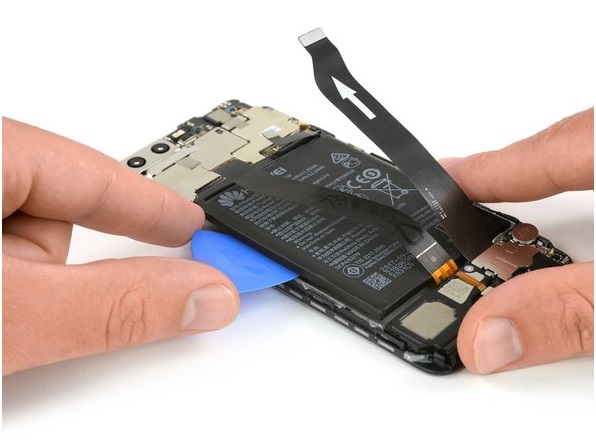
We use our phones daily up to 16-18 hours. It sounds like a lot, doesn’t it? There can be many situations, but what do you do when the phone screen is broken and you do not have the opportunity to go to a service to replace it. What’s more, you also have to pay for the screen change service.
Do you know what the solution is? FirstHelpTech tells you: you can replace the screen yourself. The team of specialists brings you the list of the necessary details and the steps you have to follow.
Check it out here:
Necessary tools and screwdrivers for disassembling Huawei
- Torx T2 screwdriver
- PH00 1.5 mm screwdriver
- Screen suction cup
- Plastic pick
- Plastic spatula
- Tweezers
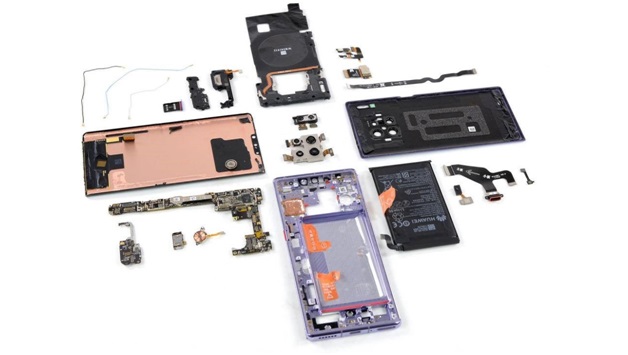
The Huawei P smart screen replacement process requires you to take apart your phone. To prevent any loss of data, do not forget to turn off the phone, as well as remove any SIM and microSD cards inside.
- Unscrew the two screws at the bottom of the device that keeps the case closed.
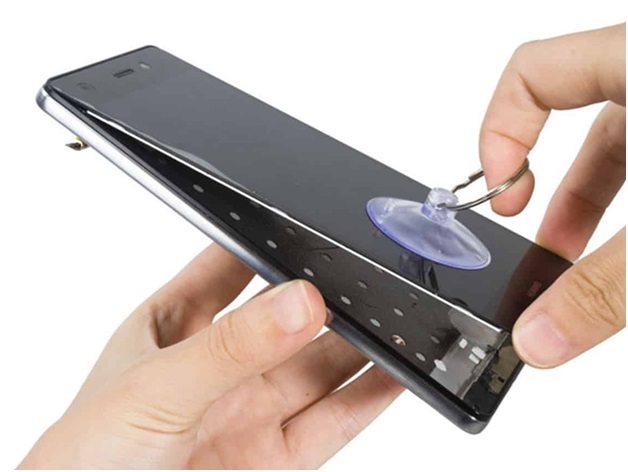
Be very careful at this point. You may injure yourself on broken glass. Use gloves or tape over the screen, to prevent any injury. Be careful during the entire Huawei P20 screen replacement process, as all components are very delicate, and some are also sharp. Place the suction cup as low as possible on the screen, for example, where it says “Huawei”. If the glass is too cracked, to create a vacuum, you can seal the screen with tape. Pull the suction cup, as soon as there is a gap between the screen and the case, you can gently insert a plastic pick. Also, move the pick around the edges to detach the display on the sides. Continue to gently pull on the suction cup.
2. Carefully disconnect the main camera using a plastic spatula.
The main camera is held in place by a metal plate. Take the plate with tweezers, carefully detach it and remove. Using a plastic spatula, carefully disconnect the connector from the circuit board. Remove the main camera.
3. Disconnect the contact of the control buttons from the motherboard.
The control buttons are glued to the side of the display frame. Insert a metal spatula between the frame and the cable to separate the glue. Start with a separate button. Then disconnect the other two buttons from the frame. Remove the cable.
4. Now disconnect the screen connector from the motherboard.
Insert a plastic spatula just below the contact and disconnect it. Next, disconnect the cable for the bottom board. Then disconnect the antenna cable from the board.
Remove the four screws that hold the motherboard. Carefully detach the motherboard on the right side with a plastic spatula. In the same way, disconnect the board on the left side.
5. Using a plastic spatula, disconnect the speaker pin from the bottom board.
Insert the blade just below the contact and carefully detach it. Remove the connecting cable for the motherboard, and carefully disconnect the antenna cable. Do not pull on the cable because you can break the connector. Then, remove the antenna cable from the guide in the screen frame.
6. Installing a new display and reassembling Huawei model
Now comes the final part of your Huawei P20 screen replacement process. It’s time to prepare the new screen for installation. Attach the display cable to the frame. Remove screen protectors from all adhesive surfaces on the display. Insert the display cable into place. Make sure the entire cable is flat, and remove the red protective film from the adhesive. Install the speaker again, and press it firmly with your fingers to make the glue stick better. Then fasten the speaker with two screws. Then carefully install the main housing.
7. Install SIM and microSD cards.
Turn on your device and drag any application to full screen. Drag the application once across the border, and then zigzag around the screen. The app should always follow your finger. Then check the display brightness again by dragging the brightness slider to the minimum and maximum.
However, before this process, you must have a screen for Huawei, right? Buy it on Firsthelptech.ie. Here you can choose the right spare parts for your phone, at the most affordable prices and with guarantees. This time around, consider investing in a Huawei P30 Pro screen protector – the cheaper alternative to the screen replacement kit.
 Daily Tech Update